# Crystallization
### Getting Started
> To get started you need 2 things:
>
> > * Some Blank Z-Crystals
> >
> > 
> >
> > * A Z-Ring
> >
> > 
> >
> > Once you have the Z-Ring you need to right-click in the Air to enable using Z-Moves
> >
> > Once you do that you will have a button for Z-Moves in your Battle GUI when\
> > a Pokémon is holding a Z-Crystal that can use a Z-Move.
### Obtaining Z-Crystals
> Z-Crystals are obtained by right-clicking certain Blocks/Entities with a Blank Z-Crystal\
> The Z-Crystal will be consumed, and you will get a Z-Crystal
>
> #### Normalium Z
>
> Made by crafting a Blank Z-Crystal with nothing in a shapeless recipe\
> 
>
> ####  Fightinium Z
>
> Made by right-clicking a Bamboo Block with a Blank Z-Crystal
>
> ####  Firium Z
>
> Made by right-clicking a Magma Block with a Blank Z-Crystal
>
> ####  Waterium Z
>
> Made by right-clicking a Wet Sponge with a Blank Z-Crystal
>
> ####  Electrium Z
>
> Made by right-clicking a Copper Block with a Blank Z-Crystal
>
> ####  Grassium Z
>
> Made by right-clicking a Wheat Crop with a Blank Z-Crystal
>
> ####  Icium Z
>
> Made by right-clicking Powder Snow with a Blank Z-Crystal
>
> ####  Rockium Z
>
> Made by right-clicking Bedrock with a Blank Z-Crystal
>
> ####  Steelium Z
>
> Made by right-clicking an Iron Block with a Blank Z-Crystal
>
> ####  Poisonium Z
>
> Made by right-clicking a Potato Crop with a Blank Z-Crystal
>
> ####  Ghostium Z
>
> Made by right-clicking Soul Sand with a Blank Z-Crystal
>
> ####  Darkinium Z
>
> Made by right-clicking Reinforced Deepslate with a Blank Z-Crystal
>
> ####  Fairium Z
>
> Made by right-clicking an Amethyst Block with a Blank Z-Crystal
>
> ####  Dragonium Z
>
> Made by right-clicking an Ender Chest with a Blank Z-Crystal
>
> ####  Buginium Z
>
> Made by right-clicking a Beehive with a Blank Z-Crystal
>
> ####  Psychium Z
>
> Made by right-clicking an Enchanting Table with a Blank Z-Crystal
>
> ####  Groundium Z
>
> Made by right-clicking a Mud Block with a Blank Z-Crystal
>
> ####  Flyinium Z
>
> Made by right-clicking a non-tinted Glass block while being at height 100+ with a Blank Z-Crystal
### Pokémon Specific Z-Crystals
> ####  Aloraichium Z
>
> Made by right-clicking an End gateway with an Electrium Z
>
> ####  Decidium Z
>
> Made by right-clicking a Target with a Grassium Z
>
> ####  Incinium Z
>
> Made by right-clicking an Sculk Block with a Firium Z
>
> ####  Primarium Z
>
> Made by right-clicking a Brain Coral Block with a Waterium Z
>
> ####  Pikanium Z
>
> Made by right-clicking a Lightning Rod with an Electrium Z
>
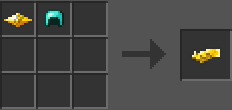
> ####  Pikashunium Z
>
> Made by crafting an Pikachum Z-Crystal with a diamond helmet in a shapeless recipe\
> [](https://camo.githubusercontent.com/94ef66f10d5d2bd70a12813ccc1047e2f82bbcd027c679b2d215641313f24247/68747470733a2f2f692e696d6775722e636f6d2f61487841766c632e706e67)
>
> ####  Tapunium Z
>
> Made by right-clicking Brain Coral Block with a Fairium Z
>
> ####  Marshadium Z
>
> Made by right-clicking a Target block with a Ghostium Z
>
> ####  Mimikium Z
>
> Made by right-clicking a Brain Coral Block with a Ghostium Z
>
> ####  Lycanium Z
>
> Made by right-clicking an Cobblestone with a Rockium Z
>
> ####  Kommonium Z
>
> Made by right-clicking a Target block with a Dragonium Z
>
> ####  Solganium Z
>
> Made by right-clicking a Magma Block with a Psychium Z
>
> ####  Lunalium Z
>
> Made by right-clicking an End Stone with a Psychium Z
>
> ####  Ultranecrozium Z
>
> Made by right-clicking Obsidian with a Psychium Z (Currently not working in battle)
>
> ####  Eevium Z
>
> Made crafting all the eevee-lution types´ z crystals with a Normalium Z\
> 
>
> ####  Mewnium Z
>
> Made by right-clicking a Brick block with a Psychium Z
>
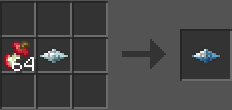
> ####  Snorlium Z
>
> Made by crafting a leftovers with a Normalium Z in a shapeless recipe\
> [](https://camo.githubusercontent.com/804ed5cd98b259f3c577ce5f3e215f8c30a5222694b1ee7ad2d4ab53d3d58666/68747470733a2f2f692e696d6775722e636f6d2f7833477a6163322e706e67)
### Miscellaneous Items
> ### Booster Energy
>
> 
>
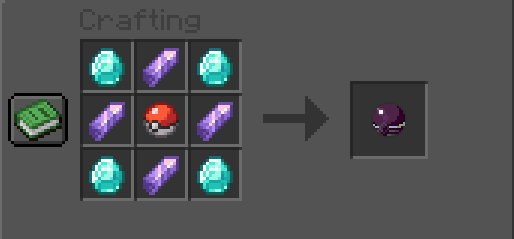
> ### Tera Orb
>
> 
---
# Agent Instructions: Querying This Documentation
If you need additional information that is not directly available in this page, you can query the documentation dynamically by asking a question.
Perform an HTTP GET request on the current page URL with the `ask` query parameter:
```
GET https://wiki.cobbletwo.com/features/gimmicks/crystallization.md?ask=
```
The question should be specific, self-contained, and written in natural language.
The response will contain a direct answer to the question and relevant excerpts and sources from the documentation.
Use this mechanism when the answer is not explicitly present in the current page, you need clarification or additional context, or you want to retrieve related documentation sections.